Computer Aided Typing Software
- Due: Friday 10/02 @ 11:59pm
- Checkpoint: Monday 09/28 @ 11:59pm
- Points: 20
- Download: cats.zip
To receive credit, you must solve each problem and then complete a short checkoff interview about your solution. You may use Preceptor for the interview or come to office hours to be interviewed by a member of the course staff. Staff will be doing in-person checkoffs for up to 3 business days after the assignment deadline (including any approved extension). If a checkoff happens more than 3 business days after the regular deadline, staff may ask to confirm your extended deadline via Flextensions. You will submit a Provenance bundle that includes a record of how you used VS Code, including interactions with Preceptor. Please do not use AI tools other than Preceptor for this assignment.

Programmers dream of
Abstraction, recursion, and
Typing really fast.
Important submission note: For full credit:
- Submit with Phases 1 and 2 complete by Monday 09/28, worth 1 pt.
- Submit the complete project by Friday 10/02.
Try to attempt the problems in order, including running the tests for each problem as you progress, since some later problems will depend on earlier problems in their implementation.
You may complete the project with a partner.
You can get 1 bonus point by submitting the entire project by Thursday 10/01. You can receive extensions on the project deadline and checkpoint deadline, but not on the early deadline, unless you're a DSP student with an accommodation for assignment extensions.
Introduction
In this project, you will write a program that measures typing speed. Additionally, you will implement typing autocorrect, which is a feature that attempts to correct the spelling of a word after a user types it. This project is inspired by typeracer.
Final Product
Our staff solution to the project can be interacted with at cats.cs61a.org. Feel free to try it out now. When you finish the project, you'll have implemented a significant part of this yourself, including the multiplayer mode!
Download starter files
To get started, download all of the project code as a zip archive.
Below is a list of all the files you will see in the archive once unzipped.
For the project, you'll only be making changes to cats.py.
cats.py: The typing test logic.utils.py: Utility functions for interacting with files and strings.ucb.py: Utility functions for CS 61A projects.data/sample_passages.txt: Text samples to be typed. These are scraped Wikipedia articles about various subjects.data/common_words.txt: Common English words in order of frequency.data/words.txt: Many more English words in order of frequency.data/final_diff_words.txt: Even more English words!data/testcases.out: Test cases for the optional Final Diff extension.cats_gui.py: A web server for the web-based graphical user interface (GUI).gui_files: A directory of files needed for the graphical user interface (GUI).tests: The pytest-grader test suite.score.py: Part of the optional Final Diff extension.
You may notice some files other than the ones listed above too—those are needed
for the test runner and portions of the GUI work. Please do not modify any files
other than cats.py.
Logistics
The project is worth 20 points. 19 points are for correctness and 1 point is for submitting Phases 1 & 2 by the checkpoint date.
Getting Started Videos
These videos may provide some helpful direction for tackling the coding problems on this assignment.
To see these videos, you should be logged into your berkeley.edu email.
Phase 1: Typing
Reminder: Throughout the project, we will only be making changes to functions in
cats.py.
Problem 1 (1 pt)
Implement pick. This function selects which passage the user will type for the typing test.
It takes three parameters:
passages: a list of potential passages (strings)select: a function that evaluates a passage and returnsTrueif it meets certain criteria, andFalseotherwisek: a non-negative integer representing the index of the desired passage among those that meet the criteria
The pick function returns the kth passage from passages for which the select function returns True.
If no such passage exists (because k is greater than or equal to the number of qualifying passages), then pick
returns an empty string.
Hint: Don't worry about the specific implementation of the
selectfunction. Just assume it takes a passage as input and returnsTrueorFalse. Reminder: Indexing starts at 0. Ifkis 0, we want to pick the first qualifying passage.
python3 -m pytest -k q01 --unlockUnlocking Examples
>>> from cats import pick
>>> ps = ['short', 'really long', 'tiny']
>>> s = lambda p: len(p) <= 5
>>> pick(ps, s, 0) # remember to put quotes ('') around strings!
______
>>> pick(ps, s, 1)
______
>>> pick(ps, s, 2)
______
python3 -m pytest -k q01Problem 2 (1 pt)
Implement the about function, which takes a list of words called keywords. It returns a
function that, when given a passage, checks whether the passage contains any of
the words in keywords. The returned function will return True if any of the
words in the keywords list are found in the passage and False otherwise.
Once about is implemented, we can use the function it returns as the select argument in pick.
This is useful because it allows us to filter passages based on whether they contain any words from the keywords list provided to the about function.
This functionality will be useful as we continue to develop our typing test.
To ensure accurate comparisons, you will need to:
- Ignore case (treat uppercase and lowercase letters as equivalent).
- Ignore punctuation in the passage.
- Only check for exact matches of the words in the
keywordslist, not substrings. For example, instances of "dogs" inpassageshould not match "dog" inkeywords.
Hint: Use the
split,lower, andremove_punctuationfunctions inutils.py.
python3 -m pytest -k q02 --unlockUnlocking Examples
>>> from cats import about
>>> from cats import pick
>>> dogs = about(['dogs', 'hounds'])
>>> dogs('A passage about cats.')
______
>>> dogs('A passage about dogs.')
______
>>> dogs('Release the Hounds!')
______
>>> dogs('"DOGS" stands for Department Of Geophysical Science.')
______
>>> dogs('Do gs and ho unds don\'t count')
______
>>> dogs("AdogsPassage")
______
python3 -m pytest -k q02Problem 3 (2 pt)
Implement accuracy, which takes both a typed passage and a source
passage. It returns the percentage of words in typed that exactly match
the corresponding words in source. Case and punctuation must match as
well. "Corresponding" means that each word in typed must appear in the same position as the matching word in source. In other words, the first word in typed must match the first word in source, the second word in typed must match the second word in source, and so on.
A word in this context is any sequence of characters separated from other words by whitespace. Therefore, treat sequences like "dog;" as a single word.
In the actual typing test, typed represents what the player has typed, and source is the passage they are attempting to replicate.
- If
typedis longer thansource, then the extra words intypedthat have no corresponding word insourceare all incorrect. - If
typedis shorter thansourceand all the words intypedcorrespond tosourceso far, then the accuracy is 100.0. - If
typedis empty andsourceis empty, then the accuracy is 100.0. - If
typedis empty butsourceis not empty, then the accuracy is 0.0. - If
typedis not empty butsourceis empty, then the accuracy is 0.0.
python3 -m pytest -k q03 --unlockUnlocking Examples
>>> from cats import accuracy
>>> accuracy("12345", "12345") # This should return 100.0 (not the integer 100!)
______
>>> accuracy("a b c", "a b c")
______
>>> accuracy("a  b  c  d", "b  a  c  d")
______
>>> accuracy("a b", "c d e")
______
>>> accuracy("Cat", "cat") # the function is case-sensitive
______
>>> accuracy("a b c d", "a d")
______
>>> accuracy("abc", " ")
______
>>> accuracy("a b \tc" , "a b c") # Tabs don't count as words
______
>>> accuracy("abc", "")
______
>>> accuracy("", "abc")
______
>>> accuracy("a b c d", "b c d")
______
>>> accuracy("cats.", "cats") # punctuation counts
______
>>> accuracy("", "") # Returns 100.0
______
python3 -m pytest -k q03Problem 4 (1 pt)
Implement wpm, which computes the words per minute, a measure of typing
speed, given a string typed and the amount of elapsed time in seconds.
Despite its name, words per minute is not based on the number of words typed,
but instead the number of groups of 5 characters, so that a typing test is not
biased by the length of words. The formula for words per minute is calculated by dividing the total number of characters typed (including spaces) by 5 (the average word length) and then dividing the result by the elapsed time in minutes.
For example, the string "I am glad!" contains ten characters
(not including the quotation marks). The words per minute calculation uses 2 as
the number of words typed (because 10 / 5 = 2). If someone typed this string in
30 seconds (half a minute), their speed would be 4 words per minute.
python3 -m pytest -k q04 --unlockUnlocking Examples
>>> from cats import wpm
>>> wpm("12345", 3) # Note: wpm returns a float (with a decimal point)
______
>>> wpm("a b c", 20)
______
>>> wpm("", 10)
______
python3 -m pytest -k q04Time to test your typing speed! You can use the command line to test your
typing speed on passages about a particular subject. For example, the command
below will load passages about cats or kittens. See the run_typing_test
function for the implementation if you're curious (but it is defined for you).
python3 cats.py -t cats kittens
You can also try out the web-based graphical user interface (GUI) using the
following command.
(You may have to use Ctrl+C or Cmd+C on your terminal to quit the GUI
after you close the tab in your browser).
python3 cats_gui.py
Phase 2: Autocorrect
In the web-based GUI, there is an "Enable Auto-Correct" option, but right now it doesn't do anything. Let's implement automatic typo correction. Whenever the user presses the space bar, if the last word they typed doesn't match a word in the dictionary but is close to one, then that similar word will be substituted for what they typed.
Problem 5 (2 pt)
Implement autocorrect, which takes a typed_word, a
word_list, a diff_function, and a limit. The goal of autocorrect
is to return the word in word_list that is closest to the provided
typed_word, as determined by diff_function.
Specifically, autocorrect does the following:
- If the
typed_wordis contained inside theword_list,autocorrectreturns that word. - Otherwise,
autocorrectreturns the word fromword_listthat has the lowest difference from the providedtyped_word. This difference is the number returned by thediff_function. - However, if the lowest difference between
typed_wordand any of the words inword_listis greater thanlimit, thentyped_wordis returned instead. In other words,limitsets a maximum threshold on how severe a typo can be for it to still be corrected.
Assume that typed_word and all elements of word_list are lowercase and
have no punctuation.
Important: If multiple strings in
word_listare tied for the lowest difference fromtyped_word,autocorrectshould return the string that appears earliest (with the smallest index) inword_list.
A diff function takes in three arguments. The first is the typed_word, the second is
the source word (in this case, a word from word_list), and
the third argument is the limit. The output of the diff function, which is
a number, represents the amount of difference between the two strings.
Here is an example of a diff function that computes the minimum of 1 + limit
and the difference in length between the two input strings:
>>> def length_diff(w1, w2, limit):
...     return min(limit + 1, abs(len(w2) - len(w1)))
>>> length_diff('mellow', 'cello', 10)
1
>>> length_diff('hippo', 'hippopotamus', 5)
6
Note: For conciseness, some unlocking tests use a ternary operator when defining a lambda function. A ternary operator is the one-line version of an
ifstatement.For example, in one of the ok tests, we define a diff function as
first_diff = lambda w1, w2, limit: 1 if w1[0] != w2[0] else 0. Here, lambda function returns 1 if the first characters ofw1andw2are different, otherwise it returns 0.
Here is a helpful hint for implementing autocorrect:
Note: Optionally, for a one-line solution, try using
maxorminwith the optionalkeyargument (which takes in a one-argument function). For example,max([-7, 2, -1], key=abs)would return-7sinceabs(-7)is greater thanabs(2)andabs(-1).
python3 -m pytest -k q05 --unlockUnlocking Examples
>>> from cats import autocorrect, lines_from_file
>>> abs_diff = lambda w1, w2, limit: abs(len(w2) - len(w1))
>>> autocorrect("cul", ["culture", "cult", "cultivate"], abs_diff, 10)
______
>>> autocorrect("cul", ["culture", "cult", "cultivate"], abs_diff, 0)
______
>>> autocorrect("wor", ["worry", "car", "part"], abs_diff, 10)
______
>>> first_diff = lambda w1, w2, limit: 1 if w1[0] != w2[0] else 0
>>> autocorrect("wrod", ["word", "rod"], first_diff, 1)
______
>>> autocorrect("inside", ["idea", "inside"], first_diff, 0.5)
______
>>> autocorrect("inside", ["idea", "insider"], first_diff, 0.5)
______
>>> autocorrect("outside", ["idea", "insider"], first_diff, 0.5)
______
python3 -m pytest -k q05Problem 6 (3 pt)
Implement furry_fixes, a diff function that could be passed into the diff_function parameter in autocorrect.
This function takes in two strings and returns the minimum number of characters that must be changed in the typed
word in order to transform it into the source word. If the strings are not of
equal length, the difference in lengths is added to the total change count.
Here are some examples:
>>> big_limit = 10
>>> furry_fixes("nice", "rice", big_limit)    # Substitute: n -> r
1
>>> furry_fixes("range", "rungs", big_limit)  # Substitute: a -> u, e -> s
2
>>> furry_fixes("pill", "pillage", big_limit) # Don't substitute anything, length difference of 3.
3
>>> furry_fixes("goodbye", "good", big_limit) # Don't substitute anything, length difference of 3.
3
>>> furry_fixes("roses", "arose", big_limit)  # Substitute: r -> a, o -> r, s -> o, e -> s, s -> e
5
>>> furry_fixes("rose", "hello", big_limit)   # Substitute: r->h, o->e, s->l, e->l, length difference of 1.
5
Important: You may not use
while,for, or list comprehensions in your implementation. Use recursion.
If the number of characters that must change is greater than limit,
then furry_fixes should return any number larger than limit and
should minimize the amount of computation needed to do so.
Why is there a limit? From Problem 5, we know that
autocorrectwill reject anysourceword whose difference with thetypedword is greater thanlimit. It doesn't matter if the difference is greater thanlimitby 1 or by 100; autocorrect will reject it just the same. Therefore, as soon as we know the difference is abovelimit, it makes sense to stop making recursive calls, saving time, even if the returned difference won't be exactly correct.These two calls to
furry_fixesshould take about the same amount of time to evaluate:>>> limit = 4 >>> furry_fixes("roses", "arose", limit) > limit True >>> furry_fixes("rosesabcdefghijklm", "arosenopqrstuvwxyz", limit) > limit True
To ensure that you are correctly saving time by stopping the recursion after
limit is reached, there is an autograder test that measures the performance of
your solution based on the number of function calls that it makes. If you fail
this test, consider adding a base case related to the limit.
Hint: you will need more than one base case to solve this problem.
String Slicing
A string is a sequence of characters. (Letters, digits, and punctuation are all characters.) A slice of a string is another string that contains some of the characters of the original. Here are some examples:
>>> a = 'strap'
>>> a[0]
's'
>>> a[1:]
'trap'
>>> a[2:]
'rap'
>>> a[1:][1:]
'rap'
python3 -m pytest -k q06 --unlockUnlocking Examples
>>> from cats import furry_fixes, autocorrect
>>> import tests.construct_check as test
>>> big_limit = 10
>>> furry_fixes("car", "cad", big_limit)
______
>>> furry_fixes("this", "that", big_limit)
______
>>> furry_fixes("one", "two", big_limit)
______
>>> furry_fixes("from", "form", big_limit)
______
>>> furry_fixes("awe", "awesome", big_limit)
______
>>> furry_fixes("awful", "awesome", big_limit)
______
>>> furry_fixes("awful", "awesome", 3) > 3
______
>>> furry_fixes("awful", "awesome", 4) > 4
______
>>> furry_fixes("awful", "awesome", 5) > 5
______
python3 -m pytest -k q06Try enabling auto-correct in the GUI. Does it help you type faster? Are the corrections accurate?
Problem 7 (3 pt)
Implement minimum_mewtations, a more advanced diff function that can be used in autocorrect, which
returns the minimum number of edit operations needed to transform the typed word into
the source word.
There are three kinds of edit operations, with some examples:
- Add a letter to
typed.- Adding
"k"to"itten"gives us"kitten".
- Adding
- Remove a letter from
typed.- Removing
"s"from"scat"gives us"cat".
- Removing
- Substitute a letter in
typedfor another.- Substituting
"z"with"j"in"zaguar"gives us"jaguar".
- Substituting
Each edit operation increases the difference between two words by 1.
>>> big_limit = 10
>>> minimum_mewtations("cats", "scat", big_limit)       # cats -> scats -> scat
2
>>> minimum_mewtations("purng", "purring", big_limit)   # purng -> purrng -> purring
2
>>> minimum_mewtations("ckiteus", "kittens", big_limit) # ckiteus -> kiteus -> kitteus -> kittens
3
We have provided a template of an implementation in cats.py. You may modify the template however you want or delete it entirely.
Hint: One of the recursive calls in
minimum_mewtationswill be similar tofurry_fixes. However, becauseminimum_mewtationsconsiders three specific types of edits (add, remove, substitute), there will need to be additional recursive calls to handle each of these cases.
If the number of edits required is greater than limit, then
minimum_mewtations should return any number larger than limit (such as
limit + 1) and should stop making recursive calls once the limit is reached to
save time.
These two calls to
minimum_mewtationsshould take about the same amount of time to evaluate:>>> limit = 2 >>> minimum_mewtations("ckiteus", "kittens", limit) > limit True >>> minimum_mewtations("ckiteusabcdefghijklm", "kittensnopqrstuvwxyz", limit) > limit True
To ensure that your code stops making recursive calls after the limit is
reached, there is an autograder test that measures the performance of your
solution based on the number of function calls that it makes.
Important: You should not use any helper functions in your implementation of
minimum_mewtations. Otherwise the autograder test might fail.
Important: Remember to remove the following line of code when you are ready to test your implementation: assert False, 'Remove this line'
python3 -m pytest -k q07 --unlockUnlocking Examples
>>> from cats import minimum_mewtations, autocorrect
>>> import tests.construct_check as test
>>> big_limit = 10
>>> minimum_mewtations("wind", "wind", big_limit)
______
>>> minimum_mewtations("wird", "wiry", big_limit)
______
>>> minimum_mewtations("wird", "bird", big_limit)
______
>>> minimum_mewtations("wird", "wires", big_limit)
______
>>> minimum_mewtations("wird", "bwird", big_limit)
______
>>> minimum_mewtations("speling", "spellings", big_limit)
______
>>> minimum_mewtations("hash", "ash", big_limit)
______
>>> minimum_mewtations("ash", "hash", big_limit)
______
>>> minimum_mewtations("roses", "arose", big_limit)     # roses -> aroses -> arose
______
>>> minimum_mewtations("tesng", "testing", big_limit)   # tesng -> testng -> testing
______
>>> minimum_mewtations("rlogcul", "logical", big_limit) # rlogcul -> logcul -> logicul -> logical
______
>>> minimum_mewtations("", "", big_limit) # nothing to nothing needs no edits
______
python3 -m pytest -k q07Try enabling auto-correct and typing again. Are the corrections more accurate?
python3 cats_gui.py
Optional: Final Diff Extension (0 pt)
You may optionally design your own diff function called
final_diff. Here are some ideas for making even more accurate corrections:
- Take into account which additions and deletions are more likely than others. For example, it's much more likely that you'll accidentally leave out a letter if it appears twice in a row.
- Treat two adjacent letters that have swapped positions as one change, not two.
- Try to incorporate common misspellings.
- Letters near to each other on the keyboard are more commonly substituted.
You can also set the limit you'd like your diff function to use by changing
the value of the variable FINAL_DIFF_LIMIT in cats.py.
You can check your final_diff's success rate on a provided dataset of common
misspellings by running:
python3 score.py
If you don't know where to start, try copy-pasting your code for furry_fixes
and minimum_mewtations into final_diff and scoring them. Looking at the
typos they fixed (and didn't fix) might give you some ideas!
Checkpoint Submission
Check to make sure that you completed all the problems in Phase 1 and Phase 2:
python3 -m pytest --scoreWhen you run pytest, you'll still see that some tests are locked because you haven't completed the whole project yet. You'll get full credit for the checkpoint if you correctly complete all the problems up to this point.
Once you are satisfied, submit the checkpoint: run Provenance: Prepare Submission Bundle from the VS Code command palette and upload the zip it creates to the Cats Checkpoint assignment on Gradescope. Be sure to submit before the checkpoint deadline of Monday 09/28. For a refresher on how to create and submit your zip with Provenance, refer to Lab 00.
Each partner must submit the version of the project that they typed.
Phase 3: Multiplayer
Typing is more fun with friends! You'll now implement multiplayer
functionality, so that when you run cats_gui.py on your computer,
it connects to the course server at
cats.cs61a.org
and looks for someone else to race against.
To race against a friend, 5 different programs will be running:
- Your GUI, which is a program that handles all the text coloring and display in your web browser.
- Your
cats_gui.py, which is a web server that communicates with your GUI using the code you wrote incats.py. - Your opponent's
cats_gui.py. - Your opponent's GUI.
- The CS 61A multiplayer server, which matches players together and passes messages around.
When you type, your GUI uploads what you have typed to your cats_gui.py server,
which computes how much progress you have made and returns a progress update.
This server also uploads a progress update to the CS 61A multiplayer server, so that your
opponent's GUI can also display your progress.
Meanwhile, your GUI display constantly tries to stay current by requesting
your opponent's progress updates from cats_gui.py, which, in turn, retrieves
that information from the multiplayer server.
Each player has an id number that is used by the server to track typing
progress.
Problem 8 (2 pt)
Implement report_progress, which is called every time the user finishes
typing a word. It takes a list of the words typed so far, a list of the words in the source text, the user's user_id, and an upload function that is used to upload
a progress report to the multiplayer server. There will never be more words in
typed than in source.
Your progress is a ratio of the words in the source that you have typed
correctly, up to the first incorrect word, divided by the number of source
words. For instance, this example has a progress of 0.25:
report_progress(["Hello", "ths", "is"], ["Hello", "this", "is", "wrong"], ...)
Your report_progress function should:
- Upload a message to the multiplayer server by calling the
uploadfunction with a dictionary containing two keys:'id'and'progress'. The'id'key should be set to the user'suser_id, and the'progress'key should store the computed progress for the user, as defined above. - Return the user's computed progress.
Hint: See the dictionary below for an example of a potential input to the
uploadfunction. This dictionary represents a player withuser_id4 andprogress0.6.
{'id': 4, 'progress': 0.6}
python3 -m pytest -k q08 --unlockUnlocking Examples
>>> from cats import report_progress
>>> print_progress = lambda d: print('ID:', d['id'], 'Progress:', d['progress'])
>>> typed = ['I', 'have', 'begun']
>>> source = ['I', 'have', 'begun', 'to', 'type']
>>> print_progress({'id': 1, 'progress': 0.6})
______
>>> report_progress(typed, source, 1, print_progress) # print_progress is called on the report
______
______
>>> report_progress(['I', 'begun'], source, 2, print_progress)
______
______
>>> report_progress(['I', 'hve', 'begun', 'to', 'type'], source, 3, print_progress)
______
______
python3 -m pytest -k q08Problem 9 (1 pt)
Implement time_per_word, which takes in two arguments:
words: a list of words that players are typing.player_timestamps: a list of lists where each inner list contains the timestamps indicating when each player finished typing each word inwords.
The function should return a dictionary with the following structure:
'words': The list of words that the players are typing.'times': A list of liststimesthat stores the durations it took each player to type each word. Specifically, the value attimes[i][j]should indicate how long it took playerito type the word atwords[j]. This would be the difference between when the player finished typingwords[j]and when the player finished typingwords[j-1]. Forwords[0], this would be the difference between when the player finished typingwords[0]and when the player started typing.
Timestamps found in the parameter player_timestamps are
cumulative and always increasing, while the values in times are
differences between consecutive timestamps for each player.
Here's an example:
If player_timestamps = [[1, 3, 5], [2, 5, 6]], then times would be [[2, 2], [3, 1]].
This is because the first player finished typing each word at timestamps 1, 3, and 5, while the second player finished typing each word at timestamps 2, 5, and 6.
So the differences in timestamps are
(3-1), (5-3) for the first player and
(5-2), (6-5) for the second player.
The first value of each list within player_timestamps represents the
initial starting time for each player.
python3 -m pytest -k q09 --unlockUnlocking Examples
>>> from cats import *
>>> p = [[1, 4, 6, 7], [0, 4, 6, 9]]
>>> words = ['This', 'is', 'fun']
>>> words_and_times = time_per_word(words, p)
>>> words, times = words_and_times['words'], words_and_times['times']
>>> words
______
>>> times
______
>>> p = [[0, 2, 3], [2, 4, 7]]
>>> words_and_times =time_per_word(['hello', 'world'], p)
>>> words, times = words_and_times['words'], words_and_times['times']
>>> words
______
>>> words[1]
______
>>> times
______
>>> times[0][1]
______
python3 -m pytest -k q09Problem 10 (3 pt)
Implement fastest_words, which returns which words each player typed fastest.
This function is called once all players have finished typing.
It takes in a dictionary returned by time_per_word.
The fastest_words function returns a list of lists of words, one list for each
player. The index of the nested list denotes the player. The list for each player contains the words they typed faster
than all the other players. In the case of a tie, the player with the smallest
index is considered to be the one who typed it the fastest.
For example, consider two players who typed Just have fun. Player 0 typed
'fun' the fastest (3 seconds), Player 1 typed 'Just' the fastest (4
seconds), and they tied on the word 'have' (both took 1 second). In this case,
Player 0 is considered the fastest for 'have' because their index is smaller.
>>> player_0 = [5, 1, 3]
>>> player_1 = [4, 1, 6]
>>> fastest_words({'words': ['Just', 'have', 'fun'], 'times': [player_0, player_1]}) # player 0 -> ['have', 'fun'], player 1 -> ['Just']
[['have', 'fun'], ['Just']]
Use the helper function get_time (provided) to get an individual time from times. It provides helpful error messages when you try to access a time that doesn't exist.
def get_time(times, player_num, word_index):
    """Return the time it took player_num to type the word at word_index,
    given a list of lists of times returned by time_per_word."""
Important: Make sure your implementation does not mutate the given player input lists. For the example above, calling
fastest_wordson[player_0, player_1]should not mutateplayer_0orplayer_1.There might not always be two players, so generalize this function in a way that will allow it to handle an indeterminate number of players.
python3 -m pytest -k q10 --unlockUnlocking Examples
>>> from cats import fastest_words, get_time
>>> p0 = [2, 2, 3]
>>> p1 = [6, 1, 2]
>>> get_time([p0, p1], 0, 1)
______
>>> fastest_words({'words': ['What', 'great', 'luck'], 'times': [p0, p1]})
______
>>> p0 = [2, 2, 3]
>>> p1 = [6, 1, 3]
>>> fastest_words({'words': ['What', 'great', 'luck'], 'times': [p0, p1]})  # with a tie, choose the first player
______
>>> p2 = [4, 3, 1]
>>> fastest_words({'words': ['What', 'great', 'luck'], 'times': [p0, p1, p2]})
______
python3 -m pytest -k q10Congratulations! Now you can play against other students in the course. Set
enable_multiplayer to True near the bottom of cats.py and type swiftly!
python3 cats_gui.py
Project Submission
Run pytest on all problems to make sure all tests are unlocked and pass:
python3 -m pytestYou can also check your score on each part of the project:
python3 -m pytest --scoreOnce you are satisfied, submit this assignment: run Provenance: Prepare Submission Bundle from the VS Code command palette and upload the zip it creates to Gradescope. For a refresher on how to do this, refer to Lab 00.
Each partner must submit the version of the project that they typed.
Phase 4: Efficiency (Extra Challenge)
Optional: Problem EC (0 pt)
Note: This problem is optional and will not worth any points. It is meant to be a extra challenge for those who are interested in improving the efficiency of their code. Only attempt this problem if you have completed all other problems in the project.
During Office Hours and Project Parties, the staff will prioritize helping students with required questions. We will not be offering help with this question unless the queue is empty. In this problem, you will implement memoization decorators that will increase the efficiency of our our program by "remembering" the results of particularly intensive operations.
Make sure you're familiar with the decorators and memoization. If you would like a refresher, open the dropdown boxes below for more information.
Decorators
A Python decorator allows you to modify a pre-existing function without changing the function's structure.
Specifically, a decorator function is a higher-order function that...
- Takes the original function as an input
- Returns a new function with modified functionality
- This new function must contain the same arguments as the original function
An example of a decorator that executes a one-input function twice is shown below:
>>> def do_twice(original_function):
...     def repeat(x):
...             original_function(x)
...             original_function(x)
...     return repeat
We can apply this function in multiple contexts:
# Printing a value twice
>>> @do_twice
... def print_value(x):
...     print(x)
...
>>> print_value(5)
5
5
# Adding an item to a list twice
>>> lst = []
>>> @do_twice
... def add_to_list(item):
...     lst.append(item)
...
>>> add_to_list(5)
>>> lst
[5, 5]
Additionally, note that we could also directly call the decorator function instead of using the @ notation (i.e. print_value = do_twice(print_value)).
However, it's typically useful to place decorators directly above the function that we are modifying since they better describe how these functions
are being changed in our code.
Memoization
Notice that the diff functions we wrote in the previous questions are very inefficient: you will likely find that the computer will make the same recursive call multiple times. For a function with multiple arguments and three recursive calls, this can be harder to see. It can be easier to first see this with a function like fib that is defined in lecture.
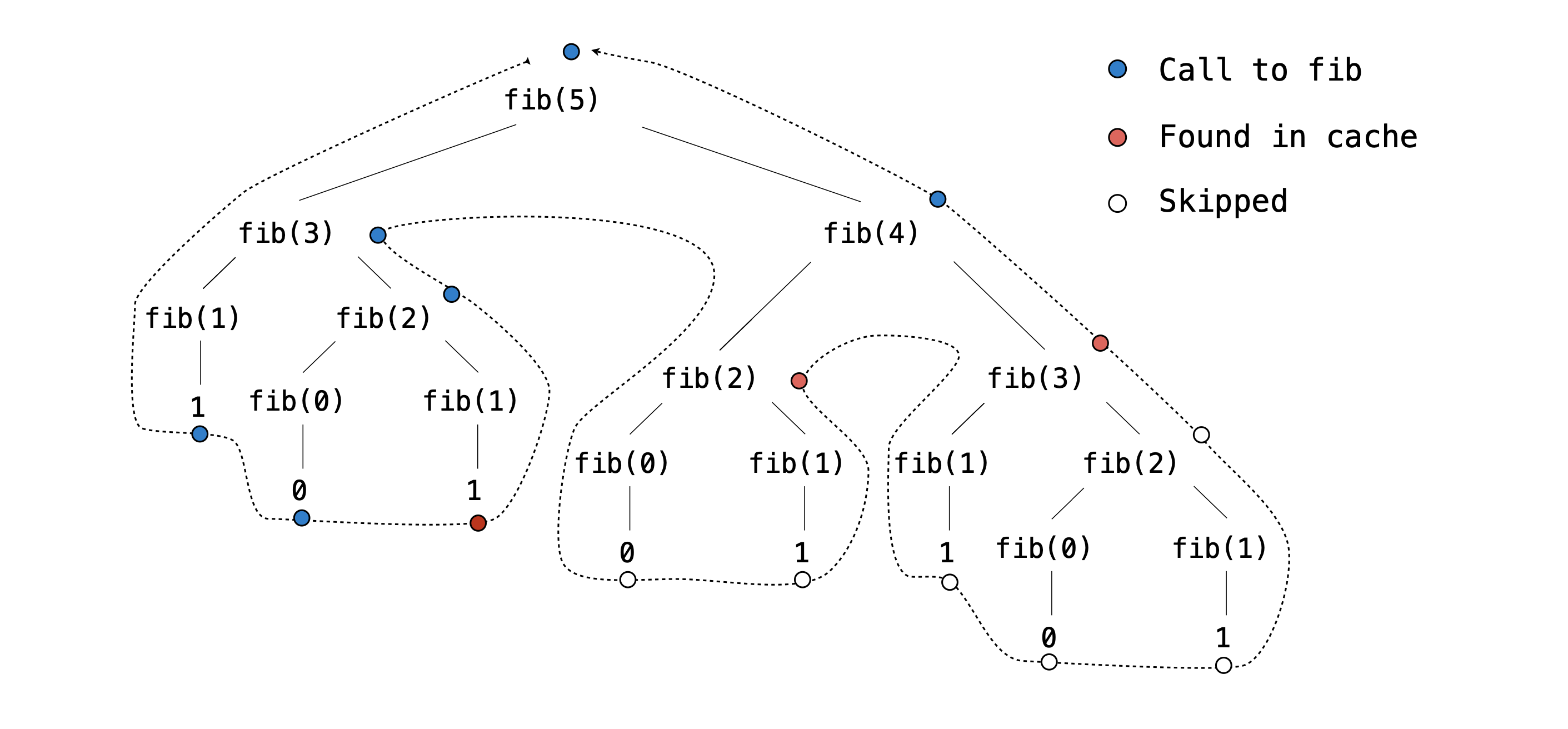
Noticed how many redundant recursive calls there are in the above tree diagram. Our goal is to have our program store past results of evaluated recursive calls so that we can reuse them if the same recursive call comes up in the future. For example, the first branch of fib(5) calls fib(3), which has not yet been evaluated. So we must go through all of its subsequent recursive calls to find its return value. However when we encounter the call to fib(3) that is a branch of fib(4), we have already found its return value before! So if we have a way to store and retrieve that information in something called a cache, we can avoid needless computation. We no longer need to make any subsequent recursive calls to its branches fib(1) and fib(2). This
is the concept of memoization: store the results of expensive computations in a cache, and retrieve information from the cache in the case we
execute a repeated action.
We will be working with two memoization decorators. memo is a general all-purpose decorator that memoizes the function it annotates. If memo encounters
an input it has not seen, it will store the calculated result into its cache. If memo receives an input it has already seen, it will take the stored
value in the cache and returns it directly without doing any extra computation. We have provided you with the full implementation of memo.
Your task is to implement memo_diff. memo_diff is a higher-order function that takes in a diff_function and returns another diff function called memoized that, like all diff functions, takes in typed, source, and limit. memoized should do the following:
- When
memoizedsees a (typed,source) pair for the first time, it should calculate the difference usingdiff_functionand cache that value along with thelimitused as a (value,limit) tuple pair. - If
memoizedencounters the (typed,source) pair again, it should return the memoizedvalueif the providedlimitis less than or equal to the cached limit. Otherwise, the difference should be recalculated, recached, and returned.
Important: When implementing this function, make sure you store pairs of values in the cache with a tuple, not a list. In dictionaries, keys must be immutable (that's why using a tuple is fine, but using a list is not). If you're curious about why
memo_diffis different thanmemoand is implemented in this way, reference the dropdown below:
More Information
How do memo and memo_diff differ? Although memo stores only the result of a function call, memo_diff takes into account an additional constraint, limit, that affects whether the cached result can be used or not. When the memo_diff function is called with a (typed, source) pair, it doesn’t just check if the pair has been seen before; it also checks if the limit is less than or equal to the cached limit. This is an additional check that memo does not perform.
Why is limit handled this way? We already know that the limit represents the maximum
difference that a diff function cares about—that is, differences above the limit might
as well be the same. So diff functions will provide an accurate difference value when it is
below the limit and an inaccurate one when it is above the limit. Therefore, we can trust a
cached difference value if it was calculated with a higher limit, but we can't trust ones
calculated with a lower limit.
For example, the result of the first call below would allow us to predict the result of the second call. The higher limit provides us with more information. However, the second call would not allow us to predict the first one.
>>> minimum_mewtations("hello", "hasldfasdfsffsfasdf", 100)
17
>>> minimum_mewtations("hello", "hasldfasdfsffsfasdf", 2)
3
Once you've implemented memo_diff, finish by:
- Decorating
autocorrectwithmemo. - Decorating
minimum_mewtationswithmemo_diff.
Running autocorrect and minimum_mewtations should now be much faster!
Note: If you are failing the autograder tests involving
call_count, it is likely that yourminimum_mewtationsimplementation (from Q7) is not having the tightest base cases possible and still needs some optimization. The tests from Q7 are not meant to be strict, so even if you passed the Q7 tests, your base cases might still not be the tightest. Make sure you are not making unnecessary recursive calls. We are being strict about this here because having the tightest base cases is crucial for the efficiency of your code.Important: Try it yourself first! Only consult the following common mistakes section if you have been stuck on one test case for a while. Otherwise, you might not learn as much from the project.
Common Mistakes
-
Consider the case
minimum_mewtations(typed = "maooo", source = "mao", limit = 0): since no transformations are allowed and the two words are not the same, how quick can your function figure out that the result is impossible? -
Consider the case
minimum_mewtations(typed = "habc", source = "hmao", limit = some_limit_greater_than_zero): Given that both strings start with the same characterh, what is the most effective approach in this situation? Should the function even attempt to "add" (resulting inhabcandmao) or "remove" (resulting inabcandhmao)? Does your implementation take advantage of this optimization?
Note: The autograder takes a bit of time to run, but it should not be longer than 10 seconds.
python3 -m pytest -k qEC --unlockUnlocking Examples
>>> from cats import minimum_mewtations, furry_fixes, autocorrect, lines_from_file
>>> all_words = lines_from_file("data/words.txt")
>>> common_words = lines_from_file("data/common_words.txt")
>>> def my_decorator(func):
...   def wrapper():
...       print("Say Hello")
...       func()
...       print("Say Goodbye")
...   return wrapper
>>> @my_decorator
... def say_hello():
...     print("Hello World")
>>> say_hello()
______
______
______
>>> def magic_decorator(func):
...   def wrapper(x):
...     return func(x * 2)
...   return wrapper
>>> @magic_decorator
... def myfunc(x):
...   return x * 3
>>> print(myfunc(4))
______
python3 -m pytest -k qEC