Lab 4: Sequences, Tree Recursion, Trees
Due by 11:59pm on Tuesday, July 7.
Starter Files
Download lab04.zip.
Attendance
You need to submit the lab problems in addition to attending to get credit for lab.
If you miss lab for a good reason (such as sickness or a scheduling conflict) or you don't get checked in for some reason, email cs61a@berkeley.edu within one week to receive attendance credit.
Sequences
Sequences are ordered collections of values that support element-selection and have length. We've worked with lists, but other Python types are also sequences, including strings.
Let us go through an example of some actions we can do with strings.
>>> x = 'Hello there Oski!'
>>> x
'Hello there Oski!'
>>> len(x)
17
>>> x[6:]
'there Oski!'
>>> x[::-1]
'!iksO ereht olleH'
Since strings are sequences, we can do with strings many of the same things that we can do to lists. We can even loop through a string just like we can with a list:
>>> x = 'I am not Oski.'
>>> vowel_count = 0
>>> for i in range(len(x)):
...     if x[i] in 'aeiou':
...         vowel_count += 1
>>> vowel_count
5
A for statement executes code for each element of a sequence, such as a list or range. Each time the code is executed, the name right after for is bound to a different element of the sequence.
for <name> in <expression>:
    <suite>
First, <expression> is evaluated. It must evaluate to a sequence. Then, for each element in the sequence in order,
<name>is bound to the element.<suite>is executed.
Here is an example:
for x in [-1, 4, 2, 0, 5]:
    print("Current elem:", x)
This would display the following:
Current elem: -1
Current elem: 4
Current elem: 2
Current elem: 0
Current elem: 5
A dictionary contains key-value pairs and allows the values to be looked up by their key using square brackets. Each key must be unique.
>>> d = {2: 4, 'two': ['four'], (1, 1): 4}
>>> d[2]
4
>>> d['two']
['four']
>>> d[(1, 1)]
4
The sequence of keys or values or key-value pairs can be accessed using
.keys() or .values() or .items().
>>> for k in d.keys():
...     print(k)
...
2
two
(1, 1)
>>> for v in d.values():
...     print(v)
...
4
['four']
4
>>> for k, v in d.items():
...     print(k, v)
...
2 4
two ['four']
(1, 1) 4
By default, iterating through a dictionary iterates through its keys.
>>> for x in d:
...     print(x)
...
2
two
(1, 1)
You can check whether a dictionary contains a key using in:
>>> 'two' in d
True
>>> 4 in d
False
Attempting to access a key that does not exist in a dictionary will cause an error.
You can use .get(<key>, <default>), which returns the value corresponding to <key> in
a dictionary or, if it doesn't exist, returns <default>.
>>> d[3]
KeyError: 3
>>> d.get(3, "fun")
"fun"
>>> d.get(2, "fun")
4
The contents of a dictionary can be modified using =:
>>> d
{2: 4, 'two': ['four'], (1, 1): 4}
>>> d[(1, 1)] = "61a"
>>> d[(1, 1)]
'61a'
A dictionary comprehension is an expression that evaluates to a new dictionary.
>>> {3*x: 3*x + 1 for x in range(2, 5)}
{6: 7, 9: 10, 12: 13}
Tree Recursion
A tree recursive function is a recursive function that makes more than one call to itself, resulting in a tree-like series of calls.
For example, this is the Virahanka-Fibonacci sequence:
0, 1, 1, 2, 3, 5, 8, 13, ....
Each term is the sum of the previous two terms. This tree-recursive function calculates the nth Virahanka-Fibonacci number.
def virfib(n):
    if n == 0 or n == 1:
        return n
    return virfib(n - 1) + virfib(n - 2)
Calling virfib(6) results in a call structure that resembles
an upside-down tree (where f is virfib):
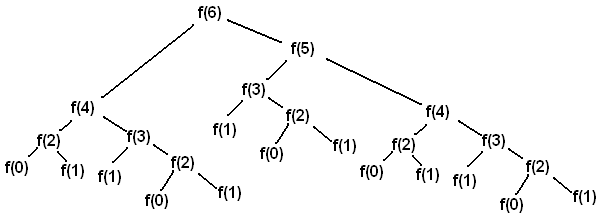
Each recursive call f(i) makes a call to f(i-1) and a call to f(i-2).
Whenever we reach an f(0) or f(1) call, we can directly return 0 or 1
without making more recursive calls. These calls are our base cases.
A base case returns an answer without depending on the results of other calls. Once we reach a base case, we can go back and answer the recursive calls that led to the base case.
As we will see, tree recursion is often effective for problems with branching choices. In these problems, you make a recursive call for each branching choice.
Data Abstraction
A data abstraction is a set of functions that compose and decompose compound values. One function called the constructor puts together two or more parts into a whole (such as a rational number; also known as a fraction), and other functions called selectors return parts of that whole (such as the numerator or denominator).
def rational(n, d):
    "Return a fraction n / d for integers n and d."

def numer(r):
    "Return the numerator of rational number r."

def denom(r):
    "Return the denominator of rational number r."
Crucially, one can use a data abstraction without knowing how these functions are
implemented. For example, we (humans) can verify that mul_rationals is
implemented correctly just by knowing what rational, numer, and denom do
without knowing how they are implemented.
def mul_rationals(r1, r2):
    "Return the rational number r1 * r2."
    return rational(numer(r1) * numer(r2), denom(r1) * denom(r2))
However, for Python to run the program, the data abstraction requires an implementation. Using knowledge of the implementation crosses the abstraction barrier, which separates the part of a program that depends on the implementation of the data abstraction from the part that does not. A well-written program typically will minimize the amount of code that depends on the implementation so that the implementation can be changed later on without requiring much code to be rewritten.
When using a data abstraction that has been provided, write your program so that it will still be correct even if the implementation of the data abstraction changes.
Tree
A tree is a data structure that represents a hierarchy of information. A file system is a good example of a tree structure. For example, within your cs61a folder, you have folders separating your projects, lab assignments, and homework. The next level is folders that separate different assignments, hw01, lab01, hog, etc., and inside those are the files themselves, including the starter files and ok. Below is an incomplete diagram of what your cs61a directory might look like.
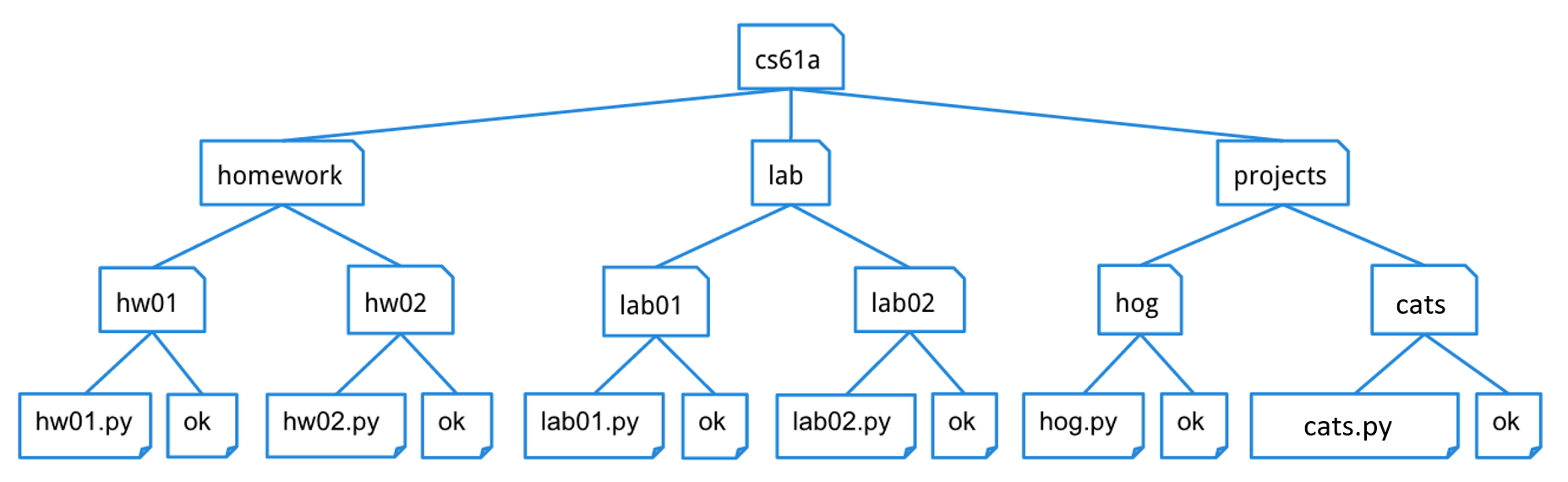
As you can see, unlike trees in nature, the tree abstract data type is drawn with the root at the top and the leaves at the bottom.
For a tree t:
- Its root label can be any value, and
label(t)returns it. - Its branches are trees, and
branches(t)returns a list of branches. - An identical tree can be constructed with
tree(label(t), branches(t)). - You can call functions that take trees as arguments, such as
is_leaf(t). - That's how you work with trees. No
t == xort[0]orx in torlist(t), etc. - There's no way to change a tree (that doesn't violate an abstraction barrier).
Here's an example tree t1, for which its branch branches(t1)[1] is t2.
t2 = tree(5, [tree(6), tree(7)])
t1 = tree(3, [tree(4), t2])
A path is a sequence of trees in which each is the parent of the next.
Our tree abstract data type consists of a root and a list of its
branches. To create a tree and access its root value and branches, use the
following interface of constructor and selectors:
Constructor
tree(label, branches=[]): creates a tree object with the givenlabelvalue at its root node and list ofbranches. Notice that the second argument to this constructor,branches, is optional — if you want to make a tree with no branches, leave this argument empty.
Selectors
label(tree): returns the value in the root node oftree.branches(tree): returns the list of branches of the giventree(each of which is also a tree)
Convenience function
is_leaf(tree): returnsTrueiftree's list ofbranchesis empty, andFalseotherwise.
For example, the tree generated by
number_tree = tree(1,
         [tree(2),
          tree(3,
               [tree(4),
                tree(5)]),
          tree(6,
               [tree(7)])])
would look like this:
   1
 / | \
2  3  6
  / \  \
 4   5  7
To extract the number 3 from this tree, which is the label of the root of its second branch, we would do this:
label(branches(number_tree)[1])The print_tree function prints out a tree in a
human-readable form. The exact form follows the pattern illustrated
above, where the root is unindented, and each of its branches is
indented one level further.
def print_tree(t, indent=0):
    """Print a representation of this tree in which each node is
    indented by two spaces times its depth from the root.

    >>> print_tree(tree(1))
    1
    >>> print_tree(tree(1, [tree(2)]))
    1
      2
    >>> numbers = tree(1, [tree(2), tree(3, [tree(4), tree(5)]), tree(6, [tree(7)])])
    >>> print_tree(numbers)
    1
      2
      3
        4
        5
      6
        7
    """
    print('  ' * indent + str(label(t)))
    for b in branches(t):
        print_tree(b, indent + 1)
Required Questions
Sequences
Important: For all WWPD questions, type
Functionif you believe the answer is<function...>,Errorif it errors, andNothingif nothing is displayed.
Many languages provide map, filter, reduce functions for sequences.
Python also provides these functions
(and we'll formally introduce them later on in the course),
but to help you better understand how they work,
you'll be implementing these functions in the following problems.
In Python, the
mapandfilterbuilt-ins have slightly different behavior than themy_mapandmy_filterfunctions we are defining here.
Q1: Map
my_map takes in a one argument function fn and a sequence seq and returns a
list containing fn applied to each element in seq.
Use only a single line for the body of the function. (Hint: use a list comprehension.)
def my_map(fn, seq):
    """Applies fn onto each element in seq and returns a list.
    >>> my_map(lambda x: x*x, [1, 2, 3])
    [1, 4, 9]
    >>> my_map(lambda x: abs(x), [1, -1, 5, 3, 0])
    [1, 1, 5, 3, 0]
    >>> my_map(lambda x: print(x), ['cs61a', 'summer', '2023'])
    cs61a
    summer
    2023
    [None, None, None]
    """
    return ______
Use Ok to test your code:
python3 ok -q my_mapUse Ok to run the local syntax checker (which checks that you used only a single line for the body of the function):
python3 ok -q my_map_syntax_checkQ2: Filter
my_filter takes in a predicate function pred and a sequence seq and returns a
list containing all elements in seq for which pred returns True. (A predicate function
is a function that takes in an argument and returns either True or False.)
Use only a single line for the body of the function. (Hint: use a list comprehension.)
def my_filter(pred, seq):
    """Keeps elements in seq only if they satisfy pred.
    >>> my_filter(lambda x: x % 2 == 0, [1, 2, 3, 4])  # new list has only even-valued elements
    [2, 4]
    >>> my_filter(lambda x: (x + 5) % 3 == 0, [1, 2, 3, 4, 5])
    [1, 4]
    >>> my_filter(lambda x: print(x), [1, 2, 3, 4, 5])
    1
    2
    3
    4
    5
    []
    >>> my_filter(lambda x: max(5, x) == 5, [1, 2, 3, 4, 5, 6, 7])
    [1, 2, 3, 4, 5]
    """
    return ______
Use Ok to test your code:
python3 ok -q my_filterUse Ok to run the local syntax checker (which checks that you used only a single line for the body of the function):
python3 ok -q my_filter_syntax_checkQ3: Reduce
my_reduce takes in a two argument function combiner and a non-empty sequence
seq and combines the elements in seq into one value using combiner.
def my_reduce(combiner, seq):
    """Combines elements in seq using combiner.
    seq will have at least one element.
    >>> my_reduce(lambda x, y: x + y, [1, 2, 3, 4])  # 1 + 2 + 3 + 4
    10
    >>> my_reduce(lambda x, y: x * y, [1, 2, 3, 4])  # 1 * 2 * 3 * 4
    24
    >>> my_reduce(lambda x, y: x * y, [4])
    4
    >>> my_reduce(lambda x, y: x + 2 * y, [1, 2, 3]) # (1 + 2 * 2) + 2 * 3
    11
    """
    "*** YOUR CODE HERE ***"
Use Ok to test your code:
python3 ok -q my_reduceData Abstraction
Cities
Say we have a data abstraction for cities. A city has a name, a latitude coordinate, and a longitude coordinate.
Our data abstraction has one constructor:
make_city(name, lat, lon): Creates a city object with the given name, latitude, and longitude.
We also have the following selectors in order to get the information for each city:
get_name(city): Returns the city's nameget_lat(city): Returns the city's latitudeget_lon(city): Returns the city's longitude
Here is how we would use the constructor and selectors to create cities and extract their information:
>>> berkeley = make_city('Berkeley', 122, 37)
>>> get_name(berkeley)
'Berkeley'
>>> get_lat(berkeley)
122
>>> new_york = make_city('New York City', 74, 40)
>>> get_lon(new_york)
40
All of the selector and constructor functions can be found in the lab file if you are curious to see how they are implemented. However, the point of data abstraction is that, when writing a program about cities, we do not need to know the implementation.
Q4: Distance
We will now implement the function distance, which computes the
distance between two city objects. Recall that the distance between two
coordinate pairs (x1, y1) and (x2, y2) can be found by calculating
the sqrt of (x1 - x2)**2 + (y1 - y2)**2. We have already imported
sqrt for your convenience. Use the latitude and longitude of a city as
its coordinates; you'll need to use the selectors to access this info!
from math import sqrt
def distance(city_a, city_b):
    """
    Returns the distance between city_a and city_b according to their
    coordinates.

    >>> city_a = make_city('city_a', 0, 1)
    >>> city_b = make_city('city_b', 0, 2)
    >>> distance(city_a, city_b)
    1.0
    >>> city_c = make_city('city_c', 6.5, 12)
    >>> city_d = make_city('city_d', 2.5, 15)
    >>> distance(city_c, city_d)
    5.0
    """
    "*** YOUR CODE HERE ***"
Use Ok to test your code:
python3 ok -q distanceQ5: Closer City
Next, implement closer_city, a function that takes a latitude,
longitude, and two cities, and returns the name of the city that is
closer to the provided latitude and longitude.
You may only use the selectors get_name get_lat get_lon, constructors make_city, and the
distance function you just defined for this question.
Hint: How can you use your
distancefunction to find the distance between the given location and each of the given cities?
def closer_city(lat, lon, city_a, city_b):
    """
    Returns the name of either city_a or city_b, whichever is closest to
    coordinate (lat, lon). If the two cities are the same distance away
    from the coordinate, consider city_b to be the closer city.

    >>> berkeley = make_city('Berkeley', 37.87, 112.26)
    >>> stanford = make_city('Stanford', 34.05, 118.25)
    >>> closer_city(38.33, 121.44, berkeley, stanford)
    'Stanford'
    >>> bucharest = make_city('Bucharest', 44.43, 26.10)
    >>> vienna = make_city('Vienna', 48.20, 16.37)
    >>> closer_city(41.29, 174.78, bucharest, vienna)
    'Bucharest'
    """
    "*** YOUR CODE HERE ***"
Use Ok to test your code:
python3 ok -q closer_cityQ6: Don't violate the abstraction barrier!
Note: this question has no code-writing component (if you implemented the previous two questions correctly).
When writing functions that use a data abstraction, we should use the constructor(s) and selector(s) whenever possible instead of assuming the data abstraction's implementation. Relying on a data abstraction's underlying implementation is known as violating the abstraction barrier.
It's possible that you passed the doctests for the previous questions even if you violated the abstraction barrier. To check whether or not you did so, run the following command:
Use Ok to test your code:
python3 ok -q check_city_abstractionThe check_city_abstraction function exists only for the doctest, which swaps
out the implementations of the original abstraction with something else, runs
the tests from the previous two parts, then restores the original abstraction.
The nature of the abstraction barrier guarantees that changing the implementation of a data abstraction should not affect the functionality of any programs that use that data abstraction, as long as the constructors and selectors were used properly.
If you passed the Ok tests for the previous questions but not this one, the fix is simple! Just replace any code that violates the abstraction barrier with the appropriate constructor or selector.
Make sure that your functions pass the tests with both the first and the second implementations of the data abstraction and that you understand why they should work for both before moving on.
Trees
Q7: WWPD: Trees
Use Ok to test your knowledge with the following "What Would Python Display?" questions:
python3 ok -q wwpd -uType
Errorif the code errors andNothingif nothing is displayed. Draw out the tree on the board or a piece of paper if you get stuck!
>>> from lab04 import *
>>> t = tree(1, tree(2))
______Error
>>> t = tree(1, [tree(2)])
______Nothing
>>> label(t)
______1
>>> label(branches(t)[0])
______2
>>> x = branches(t)
>>> len(x)
______1
>>> is_leaf(x[0])
______True
>>> branch = x[0]
>>> label(t) + label(branch)
______3
>>> len(branches(branch))
______0>>> from lab04 import *
>>> b1 = tree(5, [tree(6), tree(7)])
>>> b2 = tree(8, [tree(9, [tree(10)])])
>>> t = tree(11, [b1, b2])
>>> for b in branches(t):
... print(label(b))
______5
8
>>> for b in branches(t):
... print(is_leaf(branches(b)[0]))
...
______True
False
>>> [label(b) + 100 for b in branches(t)]
______[105, 108]
>>> [label(b) * label(branches(b)[0]) for b in branches(t)]
______[30, 72]Q8: Perfectly Balanced
Implement sum_tree, which returns the sum of all the labels in tree t.
def sum_tree(t):
    """Add all elements in a tree.

    >>> t = tree(4, [tree(2, [tree(3)]), tree(6)])
    >>> sum_tree(t)
    15
    """
    "*** YOUR CODE HERE ***"
Use Ok to test your code:
python3 ok -q sum_treeThen, implement balanced, which returns whether every branch of t has the
same total sum and that the branches themselves are also balanced.
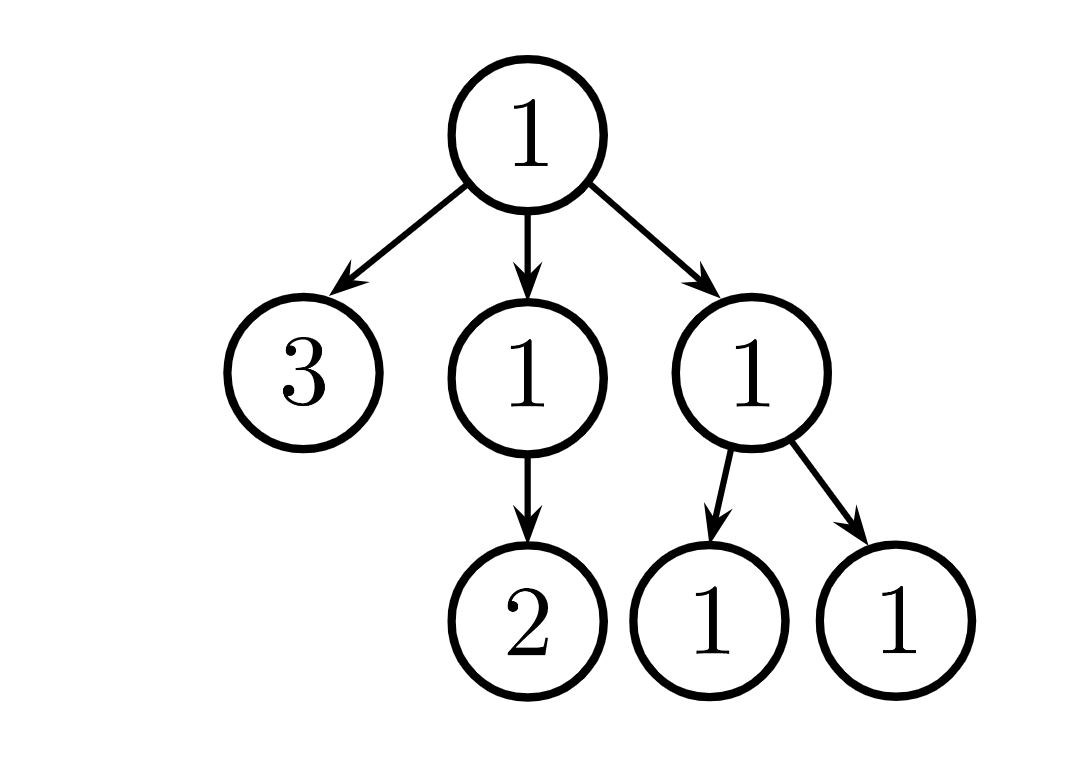
- For example, the tree above is balanced because each branch has the same total sum, and each branch is also itself balanced.
def balanced(t):
    """Checks if each branch has same sum of all elements and
    if each branch is balanced.

    >>> t = tree(1, [tree(3), tree(1, [tree(2)]), tree(1, [tree(1), tree(1)])])
    >>> balanced(t)
    True
    >>> t = tree(1, [t, tree(1)])
    >>> balanced(t)
    False
    >>> t = tree(1, [tree(4), tree(1, [tree(2), tree(1)]), tree(1, [tree(3)])])
    >>> balanced(t)
    False
    """
    "*** YOUR CODE HERE ***"
Use Ok to test your code:
python3 ok -q balancedChallenge: Solve both of these parts with just 1 line of code each.
Check Your Score Locally
You can locally check your score on each question of this assignment by running
python3 ok --scoreThis does NOT submit the assignment! When you are satisfied with your score, submit the assignment to Gradescope to receive credit for it.
Submit Assignment
Submit this assignment by uploading any files you've edited to the appropriate Gradescope assignment. Lab 00 has detailed instructions.
Correctly completing all questions is worth one point. Please ensure your TA has taken your attendance before leaving.
Optional Questions
These questions are optional. If you don't complete them, you will still receive credit for this assignment. They are great practice, so do them anyway!
Q9: Number of Trees
A full binary tree is a tree where each node has either 2 branches or 0 branches, but never 1 branch.
Write a function which returns the number of unique full binary tree structures that have exactly n leaves. See the doctests for visualizations of the possible full binary tree sturctures that have 1, 2, and 3 leaves.
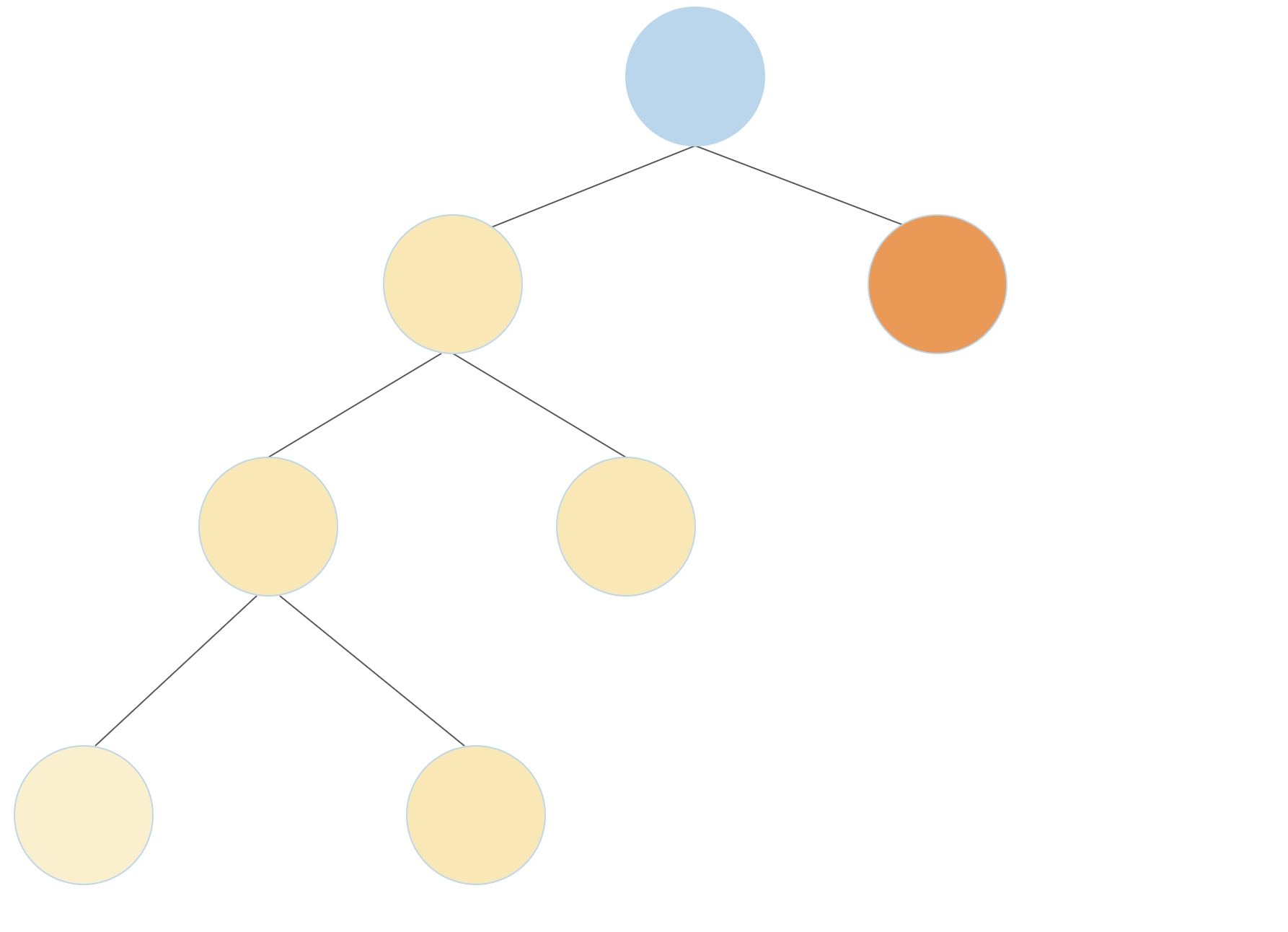
Hint: A full binary tree can be constructed by connecting two smaller full binary trees to a root node. If the two smaller full binary trees have
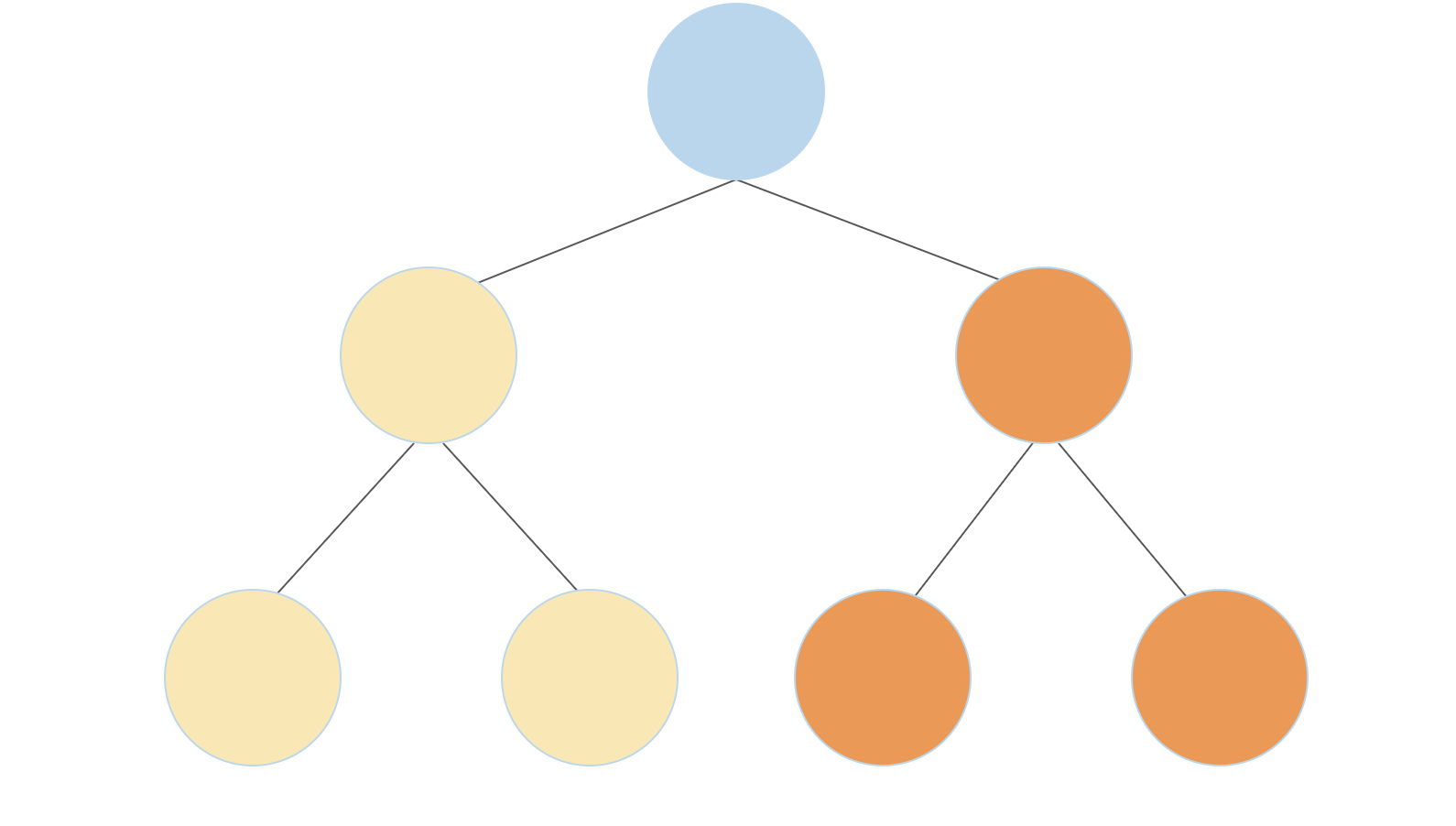
aandbleaves, the new full binary tree will havea + bleaves. For example, as shown in the first diagram below, a full binary tree with 4 leaves can be constructed by connecting a full binary tree that has three leaves (yellow) with a full binary tree that has one leaf (orange). A full binary tree with 4 leaves can also be constructed by connecting two full binary trees with 2 leaves each (second diagram)
For those interested in combinatorics, this problem does have a closed form solution):
def num_trees(n):
    """Returns the number of unique full binary trees with exactly n leaves. E.g.,

    1   2        3       3    ...
    *   *        *       *
       / \      / \     / \
      *   *    *   *   *   *
              / \         / \
             *   *       *   *

    >>> num_trees(1)
    1
    >>> num_trees(2)
    1
    >>> num_trees(3)
    2
    >>> num_trees(8)
    429

    """
    "*** YOUR CODE HERE ***"
Use Ok to test your code:
python3 ok -q num_treesQ10: Only Paths
Implement only_paths, which takes a Tree of numbers t and a number n. It
returns a new tree with only the nodes of t that are on a path from the root
to a leaf with labels that sum to n, or None if no path sums to n.
Here is an illustration of the doctest examples involving t.

def only_paths(t, n):
    """Return a tree with only the nodes of t along paths from the root to a leaf of t
    for which the node labels of the path sum to n. If no paths sum to n, return None.

    >>> print_tree(only_paths(tree(5, [tree(2), tree(1, [tree(2)]), tree(1, [tree(1)])]), 7))
    5
      2
      1
        1
    >>> t = tree(3, [tree(4), tree(1, [tree(3, [tree(2)]), tree(2, [tree(1)]), tree(5), tree(3)])])
    >>> print_tree(only_paths(t, 7))
    3
      4
      1
        2
          1
        3
    >>> print_tree(only_paths(t, 9))
    3
      1
        3
          2
        5
    >>> print(only_paths(t, 3))
    None
    """
    if ____:
        return t
    new_branches = [____ for b in branches(t)]
    if ____(new_branches):
        return tree(label(t), [b for b in new_branches if ____])
Use Ok to test your code:
python3 ok -q only_paths